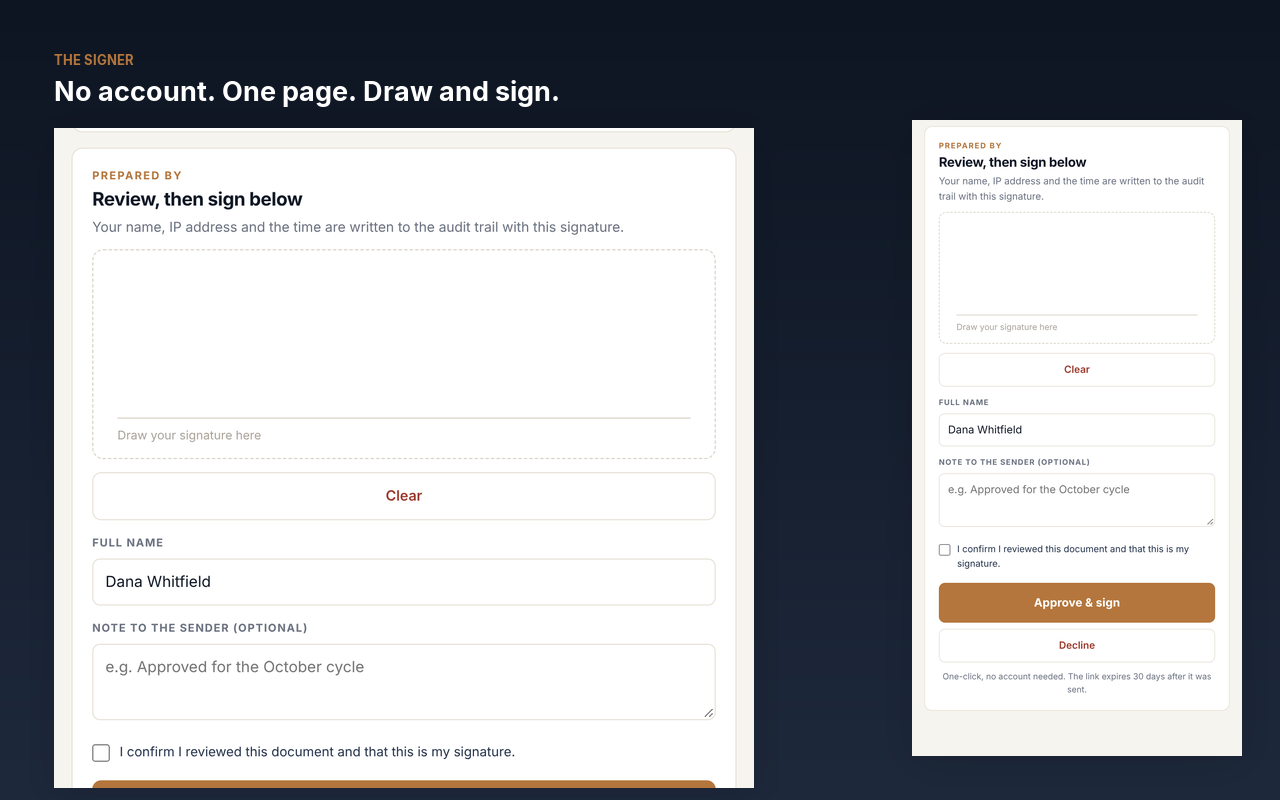
Pick a row in your approvals sheet, name up to three signers in order, and send. Each signer draws a signature on one page — no account, no portal — and every step is recorded with its IP address, timestamp and SHA-256 hash.
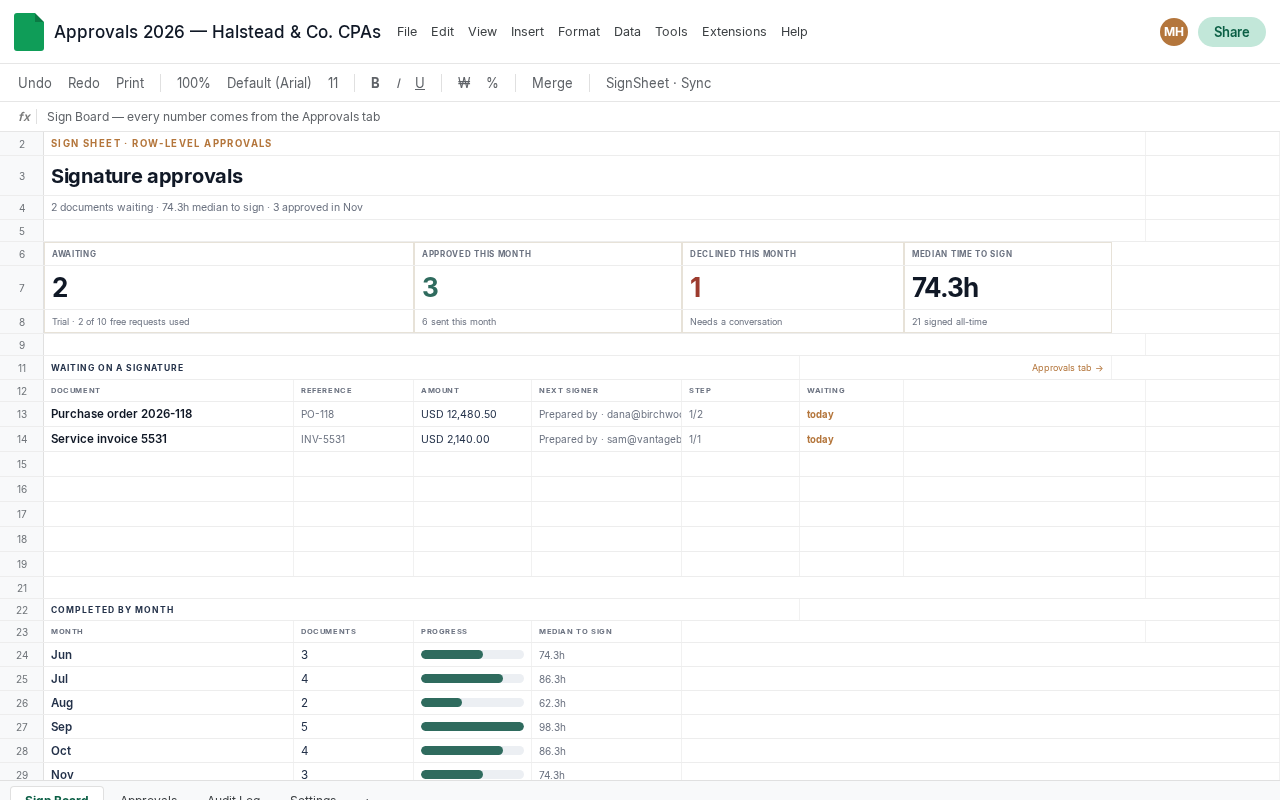
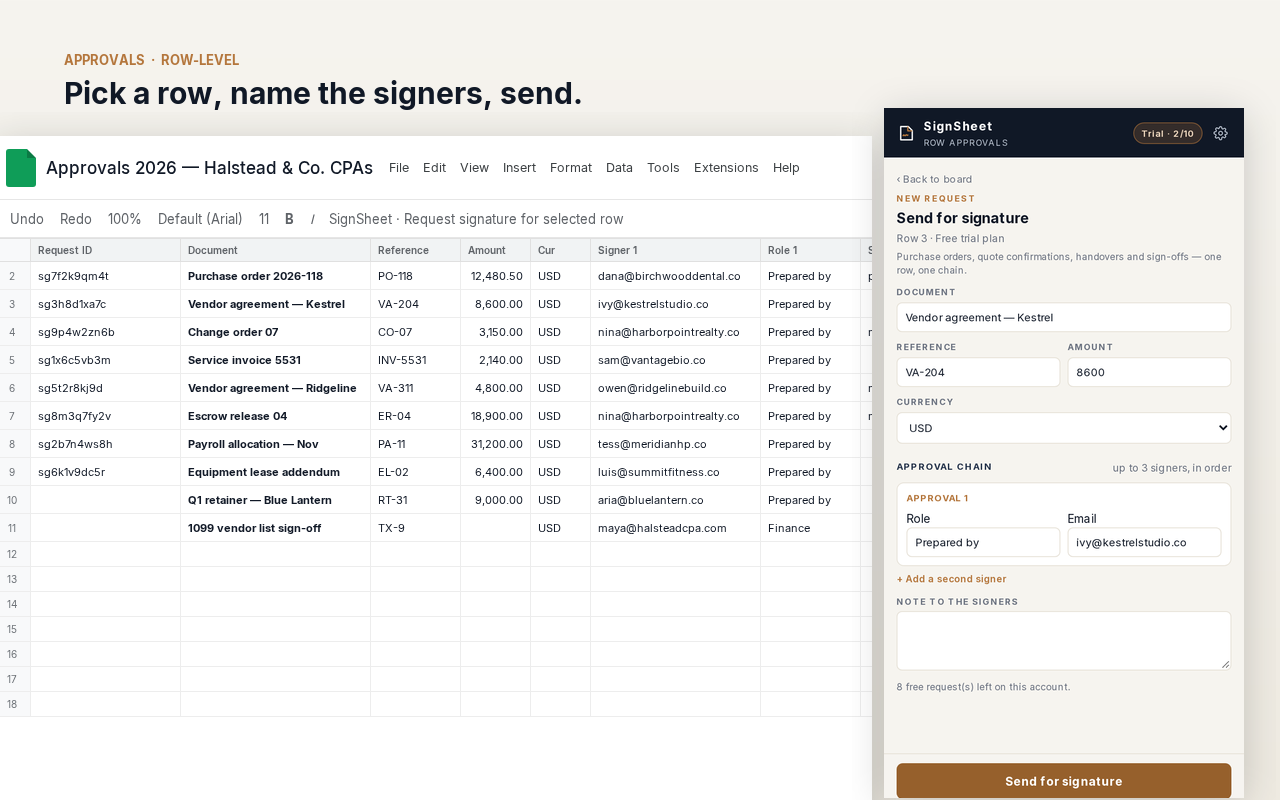
A purchase order, a quote, a delivery note or an internal sign-off lives on a row. SignSheet turns that row into a signing request, then writes the outcome back to it.
The Approvals tab holds the document title, reference, amount and the signers with their roles. Select a row, press “Request a signature”.
A personal link opens a single page: the document details, the approval chain, and a canvas for a handwritten signature. Approve or decline, add a note, done.
Status moves from Awaiting to Signed 1/3 to Approved or Declined. The next signer is emailed automatically, and the audit head is written to the row.
Every request keeps an append-only trail. Each entry's SHA-256 hash covers the previous hash, the event, the signer, the IP address, the timestamp and a digest of the signature image — so a record can be checked entry by entry, without trusting the server that stored it.
Signer name, role, email, IP address and a UTC timestamp for every signature and decline.
The record page recomputes the whole chain and says whether it still matches.
A PDF with the document details, the signature images, the full trail and the record digest.
The add-on polls the signing service and writes Approved, Declined or partial states back to the row.
Nudge the current signer with one click, or void the link so it stops accepting signatures.
Starter and Growth emails carry a small “Sent via SignSheet” line. Business removes it and uses your company name.
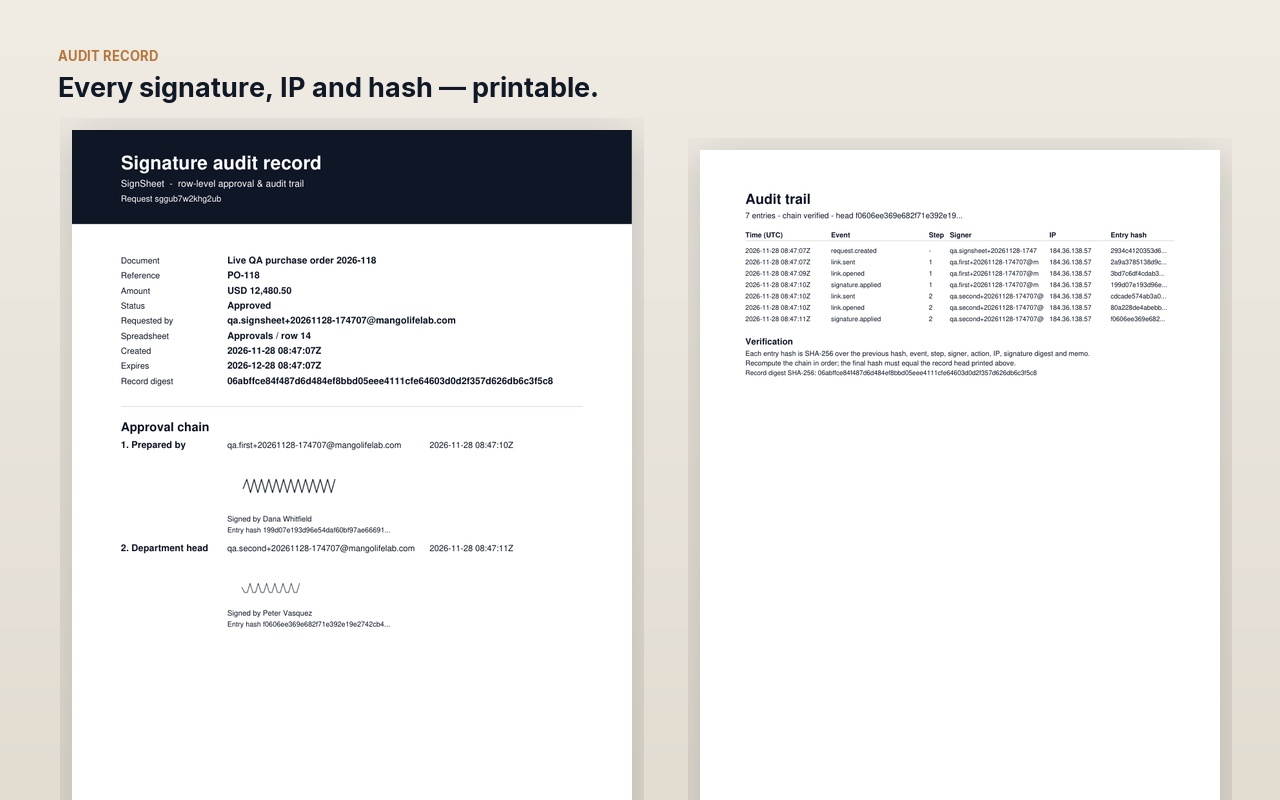
A PDF per document with the drawn signatures, the signer roles, the IP addresses, the entry hashes and a record digest. The same data is available as JSON for your own archive.
Signatures are stored with the request; the spreadsheet itself is never copied to our servers. We keep the document title, reference, amount and notes you choose to send, plus the audit entries.
The leading Sheets signature add-on on the Marketplace is Formesign. Its listing (updated 5 November 2026) advertises sequential signing, PDF copies in Drive and a price that starts at $18 per month. Here is where the two products differ.
| SignSheet | Formesign (listing) | Email + PDF | |
|---|---|---|---|
| Signature collected inside a sheet row | One request per row | Whole sheet becomes a form | No |
| Sequential approvers | Up to 3, with roles | Yes | Manual |
| Signature audit trail with IP + hash chain | Yes — PDF and JSON | Not described in the listing | No |
| Signed PDF copy | Audit record PDF | Saved to Google Drive™ | Sometimes |
| White-label emails | Business plan | Not described | Yes |
| Status written back to the row | Approved / Signed 1/3 / Declined | Real-time progress | No |
| Starting price | $19 / month | $18 / month (listing) | Free |
| Free before paying | 10 requests, no card | 7-day trial (listing) | — |
Formesign figures come from its public Marketplace listing on 28 November 2026; features not described there are marked as such rather than guessed.
Ten requests are free and need no card. Paid plans open with the Marketplace listing; everyone on the waitlist hears first.
Prices in US dollars, per spreadsheet workspace. Annual billing is 30% below twelve monthly payments. Cancel any time; the audit records you already generated stay available.
Yes. The add-on installs from the Google Workspace Marketplace on personal Gmail accounts and on Workspace domains alike. It only touches the spreadsheet it is installed in.
No. The signer opens a personal link, sees the document details and the approval chain, and draws a signature with a mouse or a finger. Nothing to install, nothing to log into.
The ten free requests are counted against your Google account, on our side as well as in the add-on. Making a copy of the sheet, reinstalling the add-on or starting a new document does not add more.
Only the document title, reference, amount, the note you write and the signers' names and email addresses — the fields shown in the signing page. The rest of the sheet is never uploaded, and signers' addresses are not shown to each other.
SignSheet records who signed, when, from which IP address, and what the document said at that moment, with a tamper-evident hash chain. Whether that meets a specific legal standard depends on your jurisdiction and your own agreement — we are not a law firm and do not give legal advice.
The licence is tied to your Google account, not the machine. Reinstalling keeps your plan and your trial count; the requests live on our servers with their audit trail.
A plan applies to one spreadsheet workspace. Team approvals within a single document — three signers in sequence — are included from Growth up. Ask about multiple workspaces when the listing opens.
Monthly plans can be cancelled at any time and stop at the end of the paid month. See the refund policy for annual plans and top-ups.
The add-on is in Marketplace review. Join the list and you will get the install link, the sample sheet and a short walkthrough the day it goes live.
 SignSheet